Produce Taste regulation grid Book
SPECIFICATION
Product Name : Mini LED display unit (full color)
Specifications and models : Q mini1.5-52 S ( COB )
Document Number :
Version number : 1.0
Drafted by: | Reviewed by: | Approved: (Official Seal) |
Company Address: Qiangli Jucai LED Display Industrial Park, No. 5 Yutashi Road, Xiang'an Industrial Zone, Xiamen Torch High-tech Industrial Development Zone, Fujian Province
Customer service hotline: 4001001222 Telephone: 0592-7885 888
Email: led@qlled.com Fax: 0592-7885656
Website: www.qlled.com Postal code: 361100
Table of contents
4. Product Technical Requirements
5. Unit Board Signal Interface Definition
6. Product Model Naming Instructions
7. Installation Hole Position Diagram
1. Scope of application
This technical manual applies only to indoor full- color Q mini 1.5 unit boards . The following are the parameters for standard products. Customization is available for special requirements.
2. Precautions
project | describe | ||
environment Notice matter | Temperature requirements | Storage temperature range: -10℃ to 30 ℃. Cooling is required if the temperature exceeds 30℃. Operating temperature range: -20℃ to 40℃. For other temperature ranges, a temperature control device needs to be installed. When the unit board is working, the lamp surface temperature should be ≤60℃. If the temperature exceeds the limit, a temperature control device needs to be installed. | |
Humidity requirements | Storage humidity range: 10%RH-60%RH. If the humidity exceeds 60%RH, dehumidification is required. Operating humidity range: 10%RH - 65%RH. If the humidity exceeds the standard, the environment must be dehumidified before normal use. | ||
Storage overdue processing | Products stored for more than one month must undergo a 6-hour aging process before normal use. The aging process is as follows: 10% full brightness for 1 hour, 30% full brightness for 1 hour, 60% full brightness for 2 hours, 80% full brightness for 1 hour, and 100% full brightness for 1 hour (brightness gradually increases during aging ) . | ||
Dust prevention requirements | Indoor products without a protection rating or IP30 should not be exposed to dusty environments, such as studio renovations or alterations, requiring special protection. LED displays should not be installed during special renovations. | ||
Corrosive gases | Corrosive gases in environments containing salt or acid can cause corrosion, crystallization, and leakage of electronic components. | ||
Electromagnetic radiation protection | The display screen should not be placed in an environment where electromagnetic radiation or radio frequency radiation exceeds a field strength of 5V/m. | ||
Avoid strong light exposure | Strong light can affect the display effect of the screen and shorten the product's lifespan. It should be avoided to install it in a direction where it will be exposed to direct sunlight for a long time. | ||
away from water sources | Indoor products have low protection levels, and water conducts electricity, which can cause short circuits and damage circuit components. Therefore, they should be kept away from water sources. | ||
Static electricity hazards, prevent lightning strikes | The metal components of the screen, the casing of the switching power supply, and the enclosure must be properly grounded. Note that the grounding resistance should be ≤10Ω and the neutral-to-ground voltage should be ≤2V. This is to prevent static electricity from damaging electronic components and to avoid leakage current from harming the human body . | ||
Personal injury | The installation angle and height of the display screen must be appropriate, and sharp edges and corners must be covered to prevent injury to the human body from the hard casing. | ||
Special environment | Display screens for use in special environments (1. seaside, swimming pool, bathhouse, basement, tunnel; 2. chemical environment, sulfur environment, halogen environment; 3. dusty or sandy environment); 4. Strong ultraviolet radiation environment; 5. Strong electromagnetic field environment; 6. Environment with temperatures below -20 degrees Celsius and above +40 degrees Celsius. A review process is required before placing an order. | ||
use operate Notice matter | Electrostatic protection | Installation personnel must wear anti-static wrist straps and gloves, and all tools must be strictly grounded during the assembly process. | |
Product batch number control | Products from different batches cannot be displayed on the same screen; otherwise, color blocks (mosaic) will appear on the screen. | ||
Product wiring | The unit board cannot be directly connected to 220V , and the positive and negative terminals of the power supply to the unit board cannot be reversed. | ||
use operate Notice matter | Disassembly and transportation process | Do not drop, push, squeeze, or press the unit board to avoid damaging the display screen; | |
Disassembly and maintenance of liquid protection | During disassembly and assembly, sweat or other liquids must not drip onto the display screen. If any liquid drips onto the screen, the affected area must be cleaned with alcohol to prevent corrosion. | ||
Install torque control | supply , ensure the terminal screws are tightened to prevent loose connections, which could lead to high contact resistance, causing wire burnout or product damage. M4 screw torque is 6.0-8.0 Kgf.cm , and M3 screw torque is 4.0-6.0 Kgf.cm. | ||
Live work is prohibited | It is forbidden to assemble the unit boards while they are powered on. The main power input should be disconnected before assembling the unit boards on the wall. It is not allowed to assemble them with power cords and signal cables inserted. | ||
Do not touch | Personnel are prohibited from touching or manipulating the LED display screen to prevent static electricity generated by friction from damaging the LED lights, chips, and other components. | ||
Loader selection | by the official website of Qiangli Jucai and the loading program in the one-click debugging section of the official website are required to avoid performance anomalies during the debugging process. | ||
Parameter settings | The refresh rate must be set according to the value specified in the datasheet to protect the normal lifespan of the lamp . | ||
Playback Control | Please do not display static images, text, or fixed backgrounds for extended periods, as this may cause severe brightness degradation of the lamps or lead to mass lamp failures. Please use scrolling images or text instead. | ||
Usage Environment | Indoor screens must not be used in outdoor or sub-outdoor environments. | ||
Environmental inspection | A temperature and humidity meter should be installed at the display screen installation site to monitor the surrounding environment in a timely manner. After heavy rain, the inside of the display screen should be checked for moisture, water droplets, or condensation. | ||
Product moisture-proof usage requirements | Fixed installation display screen | When the relative humidity of the application environment is in the range of 10% to 65%RH, it is recommended to turn on the display screen once a day and use it normally for more than 4 hours each time to remove moisture from the display screen. | |
If the relative humidity of the application environment exceeds 65%RH, dehumidification of the environment is required. It is also recommended to use the device for at least 8 hours per day, and to close relevant doors and windows at night to prevent the display from getting damp and causing malfunctions. | |||
If the display screen has not been used for a long time, it needs to be preheated and dehumidified for 8 hours before use to prevent damage to the lamps due to moisture. The dehumidification modes are: full brightness setting 10% for 1 hour, full brightness setting 30% for 2 hours, full brightness setting 60% for 2 hours, full brightness setting 80% for 2 hours, and full brightness setting 100% for 1 hour (brightness gradually increases with aging ) . | |||
Rental display screen | After each use, it must be immediately packed into the flight case and the case lid must be closed and sealed tightly. | ||
Please place at least 50g of desiccant or a moisture-absorbing bag in each flight case. | |||
Within a relative humidity range of 10% to 65%, remove the device and play videos for at least 2 hours every half month. If the relative humidity exceeds 65% or during humid weather, remove the device and play videos for at least 2 hours every week. After all videos have been played, immediately place the device in the flight case and seal it for storage. (Please check whether the desiccant or moisture-absorbing bag inside the case has expired. It needs to be replaced every 2 months. In addition, adding more desiccant can improve the dryness inside the case.) | |||
If the display screen is not used for an extended period, the overall screen brightness should be reduced by 50% and the video played for 12 hours to preheat and dehumidify it for 12 hours to prevent the LED screen from getting damp and damaging the lamps. | |||
When renting out the screen, avoid getting water on it. If water does get on it, make sure to blow the water off the screen, let it sit for 2 hours, and then turn on the screen for another 2 hours to allow the heat from the LEDs and ICs to evaporate the water. | |||
It is strictly forbidden to use indoor rental screens as outdoor rental screens, especially in open-air environments; | |||
Avoid performing construction work on the installed LED display screen. | After the LED display screen is installed, no further construction is allowed to prevent the LED display screen from being affected by high current impact and dust, such as by the operation of equipment like electric welding and electric saws. | ||
1. When handling LED light boards and panels, precautions must be taken against static electricity. The following effective protective measures should be taken: Wear a grounded anti-static wrist strap or anti-static gloves ; The screen should be strictly grounded, with a grounding resistance of ≤10 ohms, and should be inspected every six months. 2. When cleaning the surface of the light panel, do not use unknown chemical liquids. You can use a clean, dust-free or clean, damp cloth to wipe it gently. 3. The distribution box must be equipped with surge protectors and other protective facilities. | |||
3. Product Description
3.1. Indoor full-color displays offer clearer and more detailed visuals, with resolutions reaching 2K/4K/8K and above ; they achieve high refresh rates, high grayscale levels, and high lamp utilization; and feature functions such as no ghosting, anti-"caterpillar" effect, low power consumption, and low surge .
3.2 . The indoor full-color display screen is mainly composed of red LED chips , green LED chips and blue LED chips packaged into a pixel to form a matrix, and then fixed onto a plastic kit;
3.3 . The indoor full-color display screen contains a driver chip and an input buffer chip. When connected to the LED display screen control system, it can display video, images, and text information, etc.
3.4. By controlling the driver chips of red , green , and blue LEDs through system control , 4.398 trillion color changes can be formed;
3.5. The unit panels and cabinets can be spliced together arbitrarily in the horizontal and vertical directions to form displays of different sizes;
3.6. Product Features:
l Fully flip-chip LEDs, no afterimages, no "caterpillars" (LED beams), and low power consumption;
l Matte finish, non-reflective, high contrast;
l COB encapsulation, dustproof, moistureproof, surface hardness 4H, washable;
l The selected PWM driver IC ensures natural grayscale transitions, high refresh rates, and lifelike, vibrant colors in the display.
l Industry-standard 320*160 module size hole positions;
l It adopts a low-voltage driving method, resulting in a low-power cold screen.
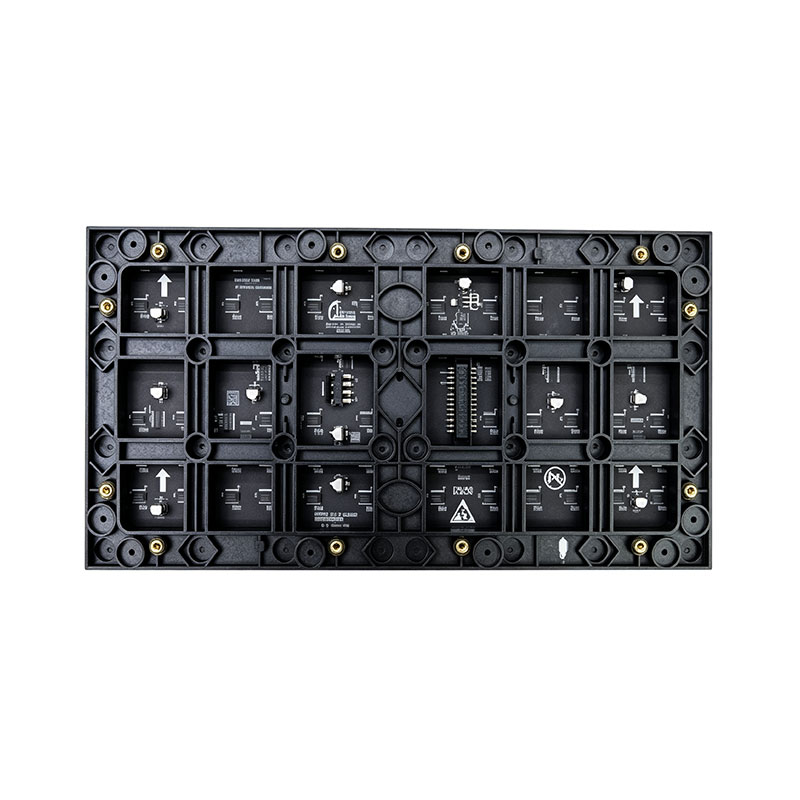
3.7 . Unit board images
face picture |
| Remark: Correction coefficients, compatible with Novartis NV3210 |
Back view | |
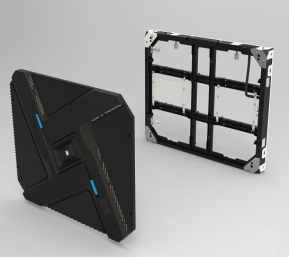
3.8 . Recommended 640*480 cabinet model
Front view | Rear view |
| |
Side view 1 | Side view 2 |
|
|
Front maintenance | Post-maintenance |
|
|
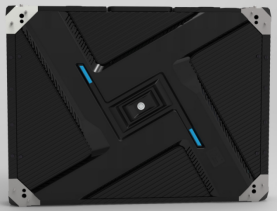
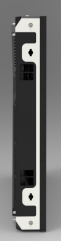
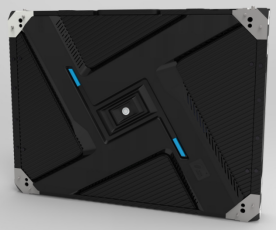
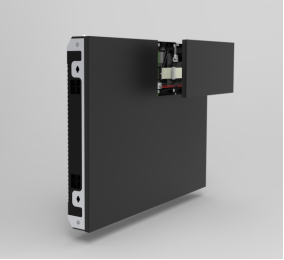
4. Product Technical Requirements
4.1. Screen Technical Parameters
brightness | ≥ 600 cd/㎡ | Brightness uniformity | >0.95 |
Screen horizontal viewing angle | 160 degrees | Screen vertical viewing angle | 160 degrees |
Optimal viewing distance | ≥ 2.7 m | Usage Environment | indoor |
Maximum power per square meter of unit board | ≤ 313 W/㎡ | ||
Power distribution capacity (maximum power per square meter ÷ 78% ÷ 85% ) | ≤ 472 W/ m² | ||
Gray levels | 13 bits each for red, green, and blue. | Display color | 4.398 trillion species |
Frame rate | ≥60 frames/second | refresh rate | 3840 Hz |
Control method | Computer-controlled, point-to-point correspondence, video synchronization, real-time display | Brightness adjustment | 256 levels manual/automatic |
Input signal | DVI/VGA/HDMI/DP, composite video signal, S-VIDEO, YPbPr (HDTV) | ||
Mean Time Between Failures | ≥ 5000 hours | ||
Operating temperature range | -20-40℃ | Operating humidity range | 10%-65% RH ( non-condensing ) |
Protective performance | Over-temperature/overload/power failure/image compensation/various correction technologies/overcurrent/overvoltage/lightning protection (optional) | ||
Screen flatness | <1mm/㎡ | ||
Screen vertical flatness | <1mm/㎡ | ||
4.2. Enclosure Technical Parameters
Box dimensions ( length * width * thickness ) | 640* 480 * 78 mm (thickness includes modules, housing , and connecting pieces ) |
Speaker resolution | 416 * 312 = 129792 Dots |
Box area | 0.307 ㎡ |
Box weight | 7.67 kg ± 0.05 kg |
Maximum power consumption (unit board power * number of unit boards in one cabinet) | ≤ 96 W |
Average power consumption (1/3 of maximum power) | ≤ 32 W |
Power distribution capacity (power utilization rate 78%, i.e., maximum power ÷ 78%) | ≤ 123 W |
4.3. Unit Board Technical Parameters
pixel pitch | 1.5mm | Pixel density | 422,500 Dots/㎡ |
Pixel composition | 1R1G1B | Lamp tube packaging | COB |
Dimensions (Length * Width * Thickness) | 320*160* 13.9 mm | weight | 0.50 kg ± 0.01 kg |
Structural features | Integrated lamp and driver | Unit board resolution | 208 * 104 = 21632 Dots |
Input voltage (DC) | 4.2 ± 0.1V | Maximum current | ≤ 3.8 A |
Unit board power | ≤ 16 W | driving method | 1/52 Constant Current Drive |
40A power supply with unit board count | 3-4 pictures | 5 0A power supply with number of unit boards | 5-6 pictures |
40A PFC power supply with number of unit boards | 5-6 pictures | 80A power supply with unit board count | 8-10 photos |
5. Unit board signal interface definition
pin | Signal | Function | pin | Signal | Function |
1 | R1 | Red Data 1 | 2 | G1 | Green Data 1 |
3 | B1/ S-CK | Blue data 1/S-CK multiplexing | 4 | GND | power ground |
5 | R2 | Red Data 2 | 6 | G2 | Green Data 2 |
7 | B2/S-MO | Blue data 2/S-MO input multiplexing | 8 | GND | power ground |
9 | R3 | Red Data 3 | 10 | G3 | Green Data 3 |
11 | B3 | Blue Data 3 | 12 | GND | power ground |
13 | R4 | Red Data 4 | 14 | G4 | Green Data 4 |
15 | B4 | Blue Data 4 | 16 | GND | power ground |
17 | A | Line control signal | 18 | B | Line control signal |
19 | C | Line control signal | 20 | S-CS | SPI-CS signal |
twenty one | S-MI | SPI Output | twenty two | GND | power ground |
twenty three | CLK | clock signal | twenty four | LAT | latch signal |
25 | OE | Enable signal | 26 | GND | power ground |
HUB 320
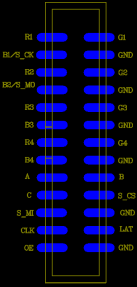
Note: The interface is a wall-mounted simple bull mount : 2.54mm pitch - dual in-line surface mount 2*13 pins.
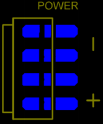 Power interface
pin | definition |
+ | Power supply positive terminal DC 4.5V |
- | negative terminal of power supply |
Note: The interface is a surface mount VH4 pin header with a 3.96mm pitch.
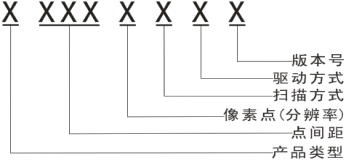 6. Product Model Naming Instructions
7. Installation Hole Location Diagram
7.1. Unit panel mounting hole positions:
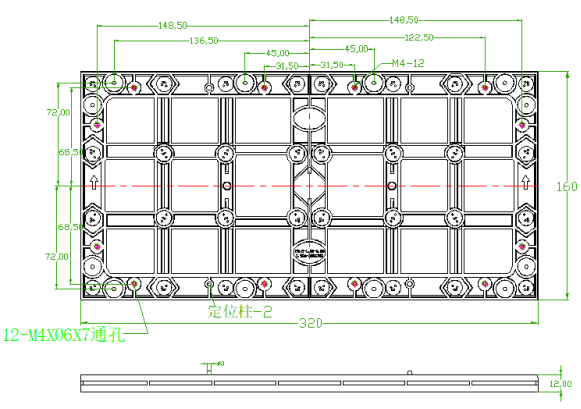
Note: "If a cabinet is required, please inform the office in advance and confirm the hole layout drawing for the order. Please refer to the CAD drawing for details."
All dimensions are in mm .
7.2. Recommended mounting hole layout for 640 * 480 enclosure:
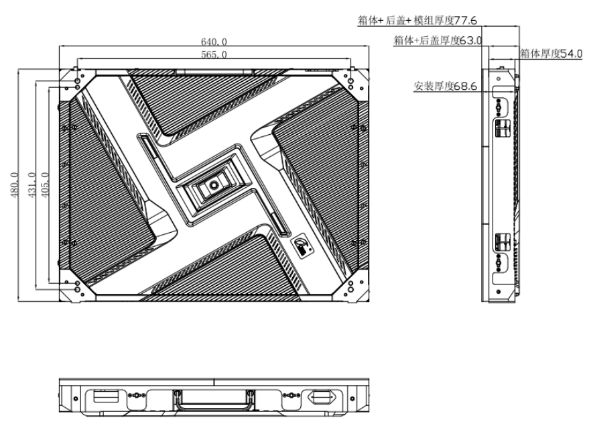
Remark: All dimensions are in mm.
This unit board is attached to the cabinet using magnetic closure and front maintenance technology, making it easy to install and remove.
8. Installation Guide
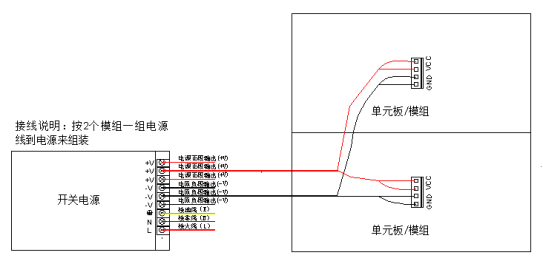
8.1. Power supply and unit board wiring diagram (This diagram is for reference only; please refer to the actual product for specific wiring methods):
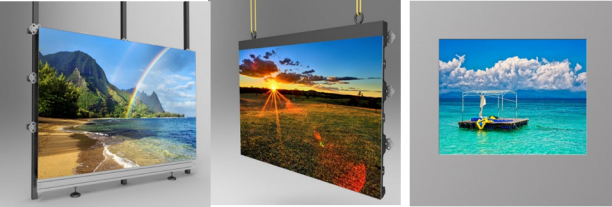
8.2. Installation Overview:
8.2.1. Display screen installation methods : It can be used for indoor rental and supports fixed installation, hanging installation and wall mounting, etc., to meet the needs of various indoor installation environments.
8.3. Acceptance requirements and methods for display screens:
8.3.1. Screen Brightness: Set the screen to full brightness. On the computer, adjust the brightness efficiency in the testing software to 80%. Within 10 minutes, use a light gun to measure the screen brightness . When measuring brightness , the light gun must be aimed directly at the screen, ideally level with it . Ensure that the black area in the observation window covers at least 16 pixels. Adjust the focus for measurement.
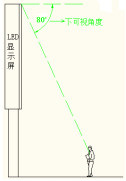
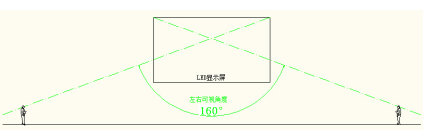
8.3.2. Viewing angle: When measuring, the person stands at a position 160 ° to the left and right of the screen and at a downward viewing angle of 80 °. The screen should be free of obvious black spots and dark patches.
8.3.3. Grounding: The casing, enclosure, and panel of the switching power supply are correctly grounded, and the grounding point is correctly marked with the grounding mark . An inspection shall be carried out every six months .
8.3.4. Lightning protection: Buildings are required to have lightning rods or lightning protection strips with effective grounding. Distribution boxes are required to be equipped with surge protectors . Lightning protection facilities shall be inspected every six months .