1. Executive Summary
Corporate exhibition spaces have evolved beyond traditional presentation rooms. Today, business headquarters, corporate showrooms, visitor centers and executive briefing rooms use large-format digital displays to communicate company strategy, present operational data, demonstrate products and support customer engagement.
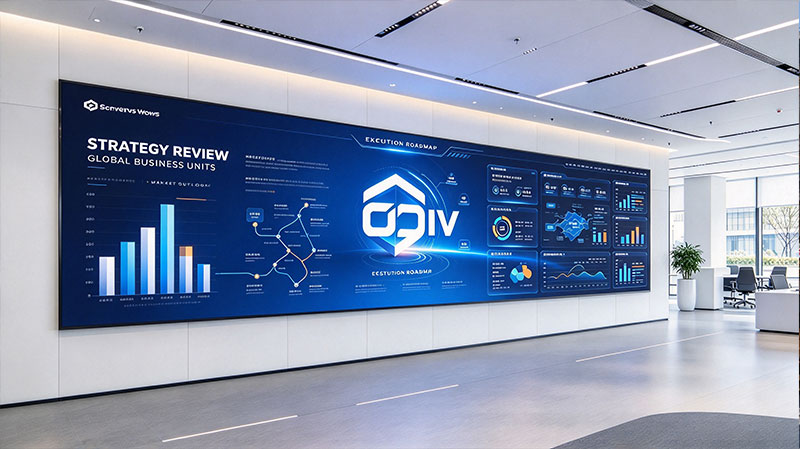
As illustrated in the reference image, a large-format LED display can serve as the central visual element of a corporate exhibition environment. It can bring together business dashboards, strategic roadmaps, performance charts and visual presentations on one continuous display surface, while complementing the architecture and interior design.
For overseas buyers, system integrators, AV contractors and corporate exhibition builders, selecting an LED display is not simply a matter of screen size or resolution. The decision involves pixel pitch, viewing distance, image quality, structural integration, content compatibility, maintenance access, operating conditions and long-term serviceability.
This white paper examines the practical technical considerations involved in specifying LED displays for corporate exhibition projects, with a focus on the requirements of professional B2B procurement and system integration.

2. Applications of LED Displays in Corporate Exhibition Spaces
Corporate exhibition environments differ from conventional retail signage and entertainment venues. Their primary purpose is often to communicate complex information clearly, present a consistent corporate identity and support professional interaction.

2.1 Corporate Visitor Centers
Visitor centers introduce a company to customers, partners, investors and other guests. LED displays can present company history, business divisions, manufacturing capabilities, product portfolios and corporate milestones.
Technical consideration: Content may combine photographs, video, text and motion graphics. Pixel pitch and display size should be selected so that visitors can comfortably read the information from the expected viewing positions.

2.2 Executive Briefing and Strategy Rooms
Executive spaces often require detailed charts, business indicators, operational summaries and strategic presentations. A large LED wall can provide a shared visual workspace for meetings and presentations.
Technical consideration: Fine pixel pitch, consistent brightness, grayscale performance and suitable signal processing are important when displaying small text, thin lines and detailed charts.

2.3 Corporate Showrooms and Product Demonstration Areas
Showrooms use visual content to explain products, services, production processes and technical capabilities. LED displays can support product launches, demonstrations, customer presentations and changing exhibition themes.
Technical consideration: The display should accommodate the intended content formats, source devices and playback workflow. Installation planning should also account for access to the display and associated equipment.

2.4 Business Operations and Data Presentation Areas
Some corporate exhibition environments incorporate operational dashboards, project progress indicators or business performance visualizations. These displays may also be used for internal presentations and management reviews.
Technical consideration: The display system must be compatible with the source resolution, graphics output, layout requirements and update frequency of the content platform.
3. Core Technical Factors in LED Display Selection
3.1 Pixel Pitch and Viewing Distance
Pixel pitch is the distance between the centers of adjacent LED pixels, usually expressed in millimeters. It directly affects pixel density and the level of detail that can be resolved at a given viewing distance.
For corporate exhibition spaces, the appropriate pitch depends on the distance between the display and the nearest regular viewer, the dimensions of the wall and the smallest details in the content.
Application condition | Selection consideration |
|---|---|
Close viewing in meeting or briefing areas | Fine pixel pitch to support detailed text and graphics |
Mixed viewing distances in visitor centers | Balance resolution, display size and typical visitor position |
Larger exhibition halls | Consider viewing distance, screen dimensions and content scale |
Detailed dashboards and data graphics | Evaluate text legibility, line clarity and source resolution |
A useful starting point is to calculate the display's pixel dimensions from its physical dimensions and pitch:
For example, a 4,000 mm-wide display with a 1.5 mm pixel pitch has approximately 2,667 pixels across its width. This is a theoretical calculation; the final pixel matrix depends on the actual cabinet and module configuration.
Pixel pitch alone does not guarantee readable content. Font size, contrast, viewing angle, source scaling and the quality of the content design also matter.
3.2 Brightness and Ambient Light
Corporate exhibition spaces commonly use controlled indoor lighting, but conditions can vary significantly. A darkened presentation room, a brightly lit reception area and a showroom with extensive glazing create different viewing environments.
Brightness should therefore be specified according to actual ambient light, screen content and the intended visual experience.
Important considerations include:
Ambient illumination: Assess the display under the lighting conditions expected during normal operation.
Brightness adjustment: Confirm that the system can be adjusted to comfortable levels for different presentations and times of day.
Uniformity: Check for visible differences in brightness between modules and across the full display.
Black level and contrast: Evaluate dark scenes, fine lines and text against the actual room environment.
Viewing comfort: Avoid specifying excessive brightness when the room does not require it.
For indoor corporate applications, maximum brightness is only one specification. Stable low-brightness performance and consistent image quality can be equally important.
3.3 Color Reproduction and Grayscale Performance
Corporate presentations frequently include branded colors, product imagery, diagrams, charts and video. The display should reproduce these elements consistently across the entire screen.
Procurement specifications should distinguish between measurable performance and subjective descriptions such as “vivid” or “premium.”
Relevant items to evaluate include:
Color consistency between cabinets and modules.
White balance and color calibration.
Grayscale transitions in dark and bright image areas.
Color reproduction at the intended operating brightness.
Uniformity when showing large areas of a single color.
Image performance after the display has warmed up.
For projects involving corporate brand guidelines, buyers should provide the integrator with the relevant color references and representative visual assets. A demonstration using actual project content is more informative than evaluating the screen with generic promotional video alone.
3.4 Refresh Rate, Grayscale and Camera Use
Refresh rate and grayscale performance are different technical characteristics. Refresh rate relates to how frequently the displayed image is refreshed, while grayscale performance concerns the representation of tonal gradations.
In corporate environments, these specifications may become particularly relevant when the LED wall is recorded or photographed for internal communications, live presentations or promotional content.
A high refresh-rate specification should not be treated as a complete guarantee of camera performance. Camera shutter settings, exposure, scan architecture, processing and the display's actual operating configuration can all affect visible artifacts.
For projects with camera use, request a demonstration or test recording using the intended camera equipment and settings.
4. Display Architecture and System Integration
An LED display installation is a complete system rather than a collection of LED cabinets. Its performance depends on the relationship between the display hardware, control system, signal sources, electrical infrastructure, mounting structure and content workflow.

4.1 Modular LED Cabinets and Display Construction
Modular construction allows an LED wall to be assembled from multiple cabinets to achieve the required overall dimensions. For fixed corporate installations, the cabinet format and connection method should be considered alongside the architectural design.
Procurement teams should confirm:
Cabinet dimensions and the resulting total pixel matrix.
Cabinet alignment and the appearance of joints.
Flatness and installation tolerances.
Mounting and structural support requirements.
Front or rear maintenance access.
Compatibility of modules, spare parts and replacement components.
The cabinet arrangement should be planned around the actual wall dimensions rather than assuming that every room will accommodate a standard aspect ratio.
4.2 Video Processing and Content Sources
A corporate exhibition wall may display presentations from a laptop, prerecorded promotional videos, live camera feeds, dashboards or content-management systems.
The display processor and associated equipment should be selected according to the actual signal and layout requirements.
System component | Procurement consideration |
|---|---|
LED receiving and control system | Compatibility with the selected LED cabinets and configuration |
Video processor | Input formats, output capacity, scaling and image-layout functions |
Source equipment | Supported resolution, frame rate and connection interfaces |
Content management | Scheduling, playback, updates and authorized access |
Network and control | Required network connections, monitoring and operating procedures |
Backup and recovery | Recovery process and replacement equipment, where required |
The buyer should request a system diagram identifying the signal path from each content source to the display. This helps establish responsibility for signal conversion, scaling, switching and troubleshooting.
4.3 Content Resolution and Screen Layout
The display's native pixel resolution should be considered before content is designed or commissioned.
A wide LED wall may have a non-standard aspect ratio, particularly when integrated into a corporate architectural feature. In such cases, conventional 16:9 content may require scaling, cropping, unused screen areas or a custom layout.
For text-heavy business dashboards, it is important to test:
Font sizes at the actual viewing distance.
Chart labels and axis markings.
Fine lines and small graphical elements.
The clarity of logos and corporate typography.
Multiple windows and split-screen layouts.
Transitions between presentation and video content.
The final acceptance process should include real presentation slides and representative dashboard content, not just high-resolution promotional footage.
5. Installation and Architectural Integration
The reference image shows an LED wall integrated into a contemporary corporate interior, extending across a substantial portion of the wall. This type of installation requires coordination between the display supplier, AV integrator, architect, electrical contractor and construction team.
5.1 Structural and Mechanical Planning
The mounting structure must be suitable for the actual weight, dimensions and installation arrangement of the LED wall. The building structure and attachment points must be checked by appropriately qualified project professionals.
Key planning items include:
Wall construction and available fixing points.
Total installed display weight.
Cabinet mounting method and alignment adjustment.
Required clearance for cabling and ventilation.
Front or rear service access.
Access equipment and safe maintenance procedures.
Coordination with architectural finishes and adjacent equipment.
A flush or near-flush installation may create a clean architectural appearance, but it should not compromise access to serviceable components or required airflow.
5.2 Electrical Supply and Thermal Management
LED displays require suitable electrical distribution and heat management. Power planning should use the manufacturer's documented electrical data for the exact proposed configuration.
Buyers should request both maximum and typical operating power where available. Maximum power is relevant to electrical infrastructure and protection design; typical power helps estimate normal operating costs, although actual consumption depends on content and brightness settings.
The project team should confirm:
Supply voltage and frequency.
Maximum current and power demand.
Circuit allocation and electrical protection.
Power distribution and cable routing.
Heat dissipation and room HVAC considerations.
Shutdown, restart and recovery procedures.
For a permanently installed wall, these requirements should be reviewed before the wall finishes and service spaces are finalized.
5.3 Maintenance Access and Serviceability
Maintenance is a practical procurement issue, not merely a technical detail. A large display in a reception or executive area may be difficult to take out of service during normal business hours.
The selected service arrangement should reflect the installation location and the owner's operating requirements.
Maintenance consideration | Questions for the supplier |
|---|---|
Module replacement | Can a faulty module be replaced without dismantling a large section of the wall? |
Service direction | Is the system designed for front or rear service? |
Spare parts | Which components are recommended as project spares? |
Calibration | How is visual consistency restored after component replacement? |
Troubleshooting | What diagnostic information is available to the integrator? |
Documentation | Are maintenance instructions and component identification supplied? |
Where rear access is limited or unavailable, front-service design may be relevant. The final decision should be based on the cabinet construction and the actual maintenance workflow, not simply on a general product description.
6. Reliability, Quality Control and Project Documentation
For overseas B2B buyers, the supplier's ability to document the product and support the installation is an important part of project evaluation.
A credible procurement process should distinguish between published product specifications, factory test results, project-specific configuration data and independently verified compliance documentation.
6.1 Manufacturing and Inspection
Before shipment, the project team should agree on the inspection scope and acceptance criteria. Depending on the product and project, inspection may include:
Visual examination of LED modules and cabinets.
Confirmation of the supplied configuration and quantities.
Pixel and module functionality checks.
Brightness and color consistency checks.
Test patterns and full-screen image inspection.
Control-system and signal-input verification.
Burn-in or continuous-operation testing, where specified.
Inspection of packaging and shipping protection.
The supplier should identify which checks are standard factory procedures and which are additional project-specific requirements. Test duration, sample size and pass/fail criteria should be agreed in advance rather than assumed.
6.2 Technical Documents for Overseas Procurement
A professional RFQ or tender response should make it possible to compare the proposed product with the actual project requirements.
Useful documents include:
Product datasheet for the exact LED cabinet or module.
Cabinet dimensions, weight and mechanical drawings.
Pixel pitch and native display resolution.
Brightness, refresh rate and grayscale specifications.
Electrical consumption and power requirements.
Signal and control-system compatibility information.
Installation and maintenance instructions.
Relevant test reports and applicable compliance documents.
Recommended spare-parts list.
Warranty terms and technical support arrangements.
Compliance documents should be checked for the correct manufacturer, product scope, model and applicable requirements. A general certificate or a document for a different product should not be treated as proof that the proposed system complies.
7. Procurement Framework for Overseas Buyers
For distributors, AV integrators, exhibition contractors and corporate project procurement teams, a structured specification makes supplier quotations easier to compare and reduces the risk of misunderstandings during production and installation.
7.1 Comparing Supplier Proposals
When comparing offers, procurement teams should distinguish between specifications that can be checked directly and statements that require additional evidence.
Evaluation area | What to request |
|---|---|
Product configuration | Exact model, pixel pitch, cabinet size and pixel matrix |
Image performance | Datasheet values and demonstration under comparable conditions |
Mechanical design | Drawings, mounting details and service-access requirements |
System integration | Signal-flow diagram, processor configuration and supported inputs |
Quality assurance | Inspection procedures, test records and agreed acceptance criteria |
Delivery | Production lead time, shipping configuration and packaging details |
Project support | Installation guidance, troubleshooting and warranty terms |
A quotation that specifies only pixel pitch, brightness and total screen size is not sufficient for a complex architectural installation. The complete system configuration and division of responsibilities should be documented.
7.2 Total Cost of Ownership
The purchase price is only one part of the overall project cost. Depending on the installation, buyers may also need to account for:
Mounting structures and architectural preparation.
Electrical distribution and installation labor.
Video processing and source equipment.
Content creation and content-management software.
Commissioning and calibration.
Energy consumption and cooling.
Spare parts and maintenance labor.
Warranty coverage and future technical support.
A meaningful comparison uses the same scope, operating assumptions and service requirements for each supplier. Otherwise, a lower initial quotation may simply exclude equipment or services that another proposal includes.
8. Project Acceptance and Commissioning
Commissioning verifies that the installed system performs according to the agreed project requirements. It should involve the supplier or integrator, the buyer's representative and relevant technical personnel.
Physical installation inspection
Verify cabinet alignment, overall flatness, mounting security, finish quality, cable routing and maintenance access against the approved drawings.
Electrical and system checks
Verify the power configuration, control connections, signal routing and correct startup and shutdown behavior.
Image-quality inspection
Display solid-color fields, grayscale patterns, fine lines, text, representative graphics and video. Check for visible inconsistencies, defective pixels and image artifacts against the agreed criteria.
Content and compatibility testing
Test the actual content sources, intended output resolutions, presentation software and any required split-screen or switching functions.
Operational handover
Provide configuration records, operating instructions, maintenance documentation, warranty information and a clear process for reporting faults.
Acceptance criteria should be defined before production. For example, if a project requires a specific brightness range, uniformity tolerance or maximum number of defective pixels, those values should be included in the contract or approved technical specification and measured using an agreed method.
9. Common Specification Mistakes
Choosing pixel pitch based only on the advertised resolution. A high-resolution wall may be unnecessary if the audience is far away, while a coarse pitch may make detailed dashboard content difficult to read at close range. Selection should begin with viewing distance and content requirements.
Specifying maximum brightness without considering the room. A corporate briefing room and a daylight-filled reception area have different lighting conditions. Brightness should be matched to the installation environment and should be adjustable where appropriate.
Treating the LED wall as a standalone product. The processor, signal sources, electrical supply, structure and control workflow are all part of the delivered solution.
Ignoring service access until installation. Maintenance arrangements can affect cabinet selection, wall depth, surrounding construction and future operating costs.
Approving a demonstration using unrelated content. A wall that looks excellent with full-screen video may perform differently with small labels, spreadsheet-style graphics or corporate presentation slides. Test the actual content wherever possible.
Comparing quotations with different scopes. Differences in processing, installation, spares, testing, commissioning and warranty terms can make headline prices misleading.
10. Conclusion
An LED display for a corporate exhibition space should be specified as an integrated visual communication system, not simply as a large screen.
The central technical decisions are the relationship between pixel pitch and viewing distance, the display's performance under actual ambient lighting, the quality of color and grayscale reproduction, the compatibility of the processing system, and the practical requirements of installation and maintenance.
For overseas procurement teams, the most useful supplier is one that can translate the architectural and communication requirements of a project into a clearly documented technical configuration. Detailed drawings, transparent product specifications, verifiable test records and a defined commissioning process help establish a reliable basis for delivery and long-term operation.
For HITU Display, corporate exhibition projects are an opportunity to work with distributors, AV integrators, contractors and project owners on the practical details that determine whether a display performs as intended: the screen configuration, system integration, installation coordination, inspection requirements and ongoing support.